
What a PEP tutoring invoice needs to look like
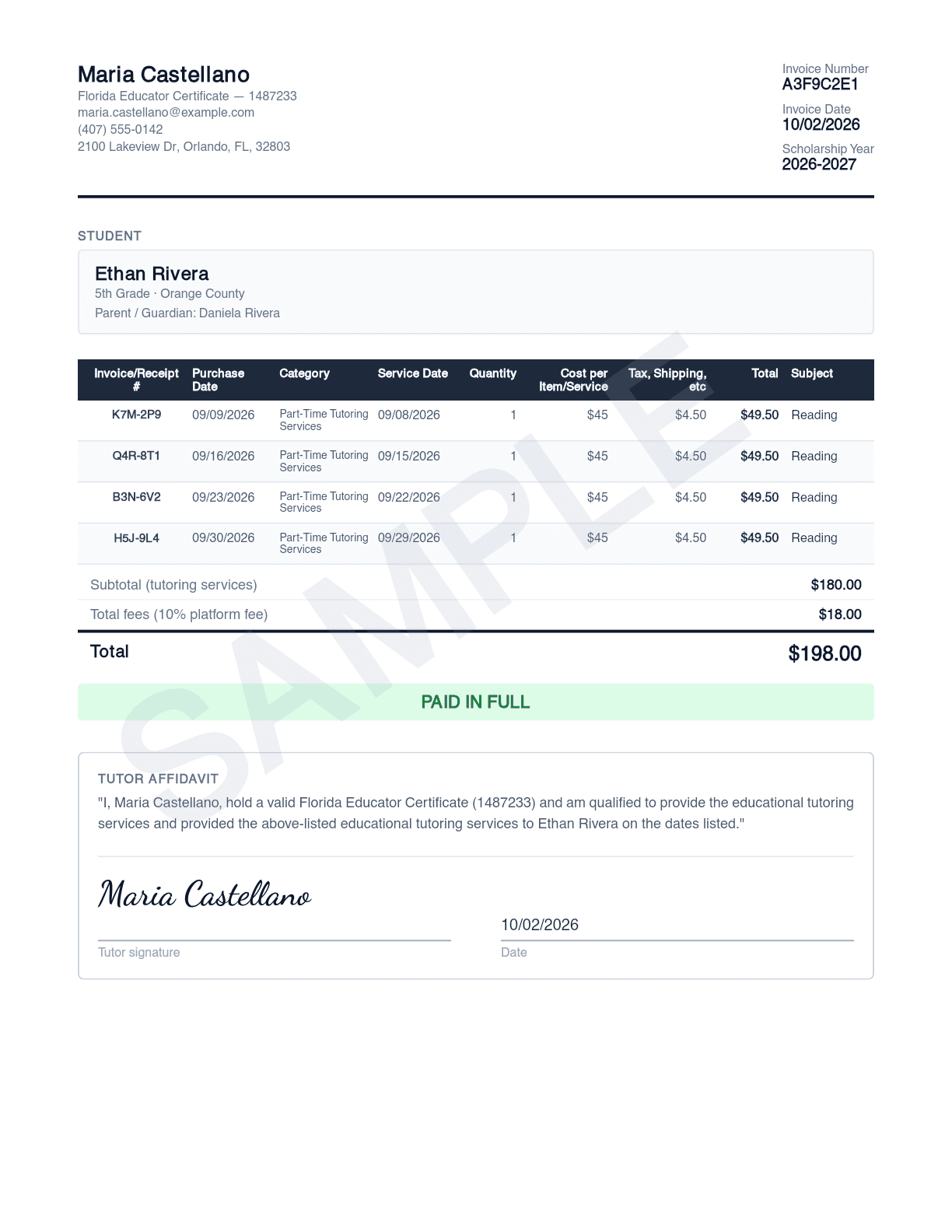
This is a real ScholarLedger invoice and session receipt, generated with fictional names. Each numbered field below is there because a Step Up rule requires it.
Last updated September 6, 2026.
The invoice, field by field
- 1
Tutor name, credential, and contact details
The provider's name must match the credential Step Up vets. Listing the credential type and number on the invoice itself answers the eligibility question before a reviewer has to ask.
- 2
Invoice number, invoice date, scholarship year
Every document carries a complete MM/DD/YYYY date. The scholarship year tells you which July 31 deadline this invoice belongs to.
- 3
Student and parent, as entered in EMA
The student's name has to match EMA exactly. The parent named here is the payer on the proof of payment, so the names line up across both documents.
- 4
One line per session, in EMA's column order
Invoice/Receipt #, Purchase Date, Category, Service Date, Quantity, Cost per Item/Service, Tax/Shipping, Total. These are EMA's own field names, so transcribing into the portal is a straight copy across.
- 5
The platform fee, itemized per line
Step Up requires a clear breakdown of base cost, taxes, fees, and total. The 10% platform fee sits in EMA's "Tax, Shipping, etc" column so each row's Quantity × Cost + Tax equals its Total.
- 6
Subtotal, total fees, and grand total
Summed from the line items, never typed separately, so the invoice can't disagree with itself.
- 7
Paid in full
Step Up: "An invoice that does not show payment in full, or that does not list how payment was made, will not be accepted." The badge only appears when every session on the invoice has cleared payment.
- 8
Tutor affidavit and signature
The tutor attests to the credential and to having delivered the listed sessions. The credential is snapshotted at signing, so a later profile edit can't change what was sworn.
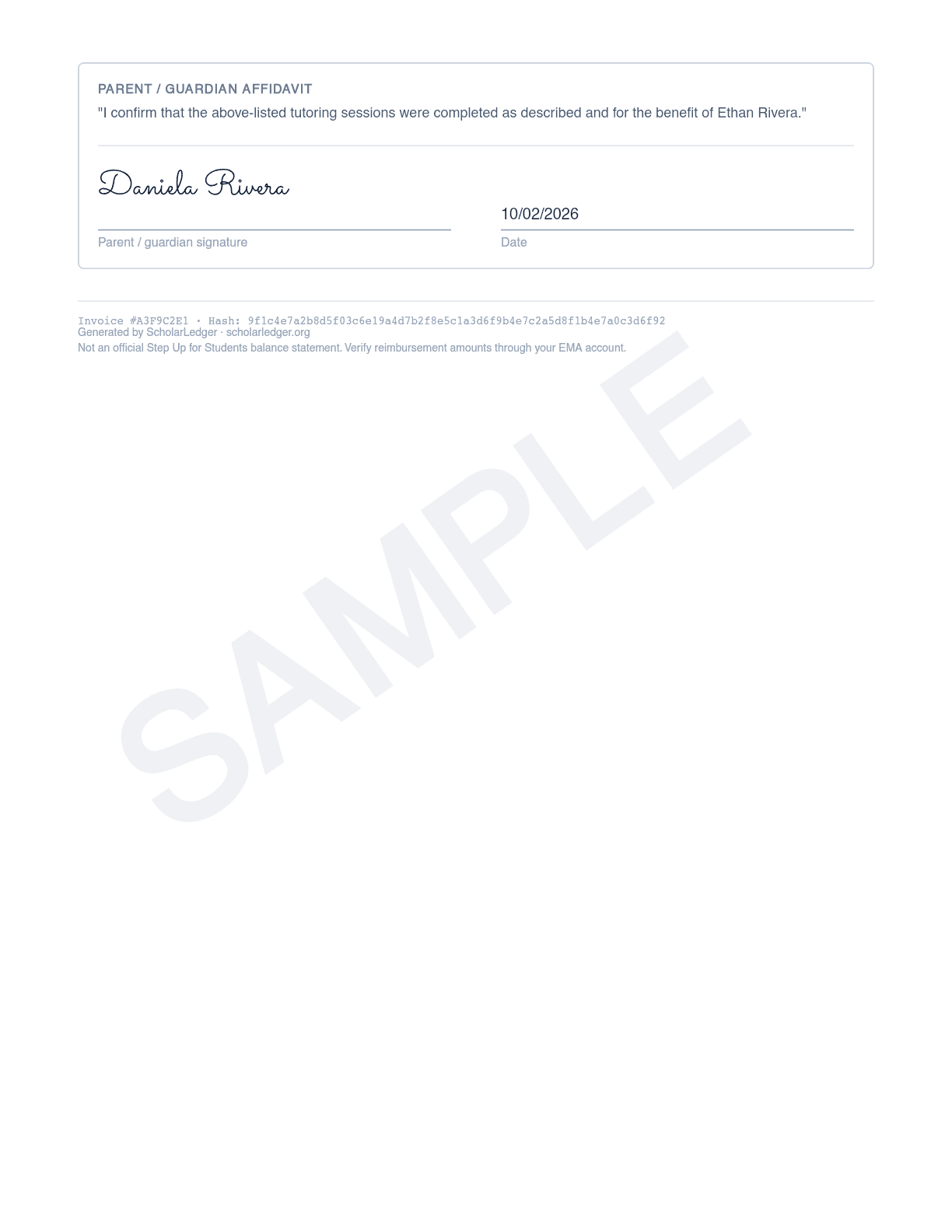
Parent affidavit and signature
The parent confirms the sessions happened for the named student. The tutor signs first, then the parent, so neither party can finalize the document alone.
Invoice hash
A SHA-256 fingerprint of the invoice contents. Sessions on a generated invoice are locked, so the same session can never be billed on two invoices.
Which Step Up rule each field satisfies
From Step Up's PEP Reimbursement page and PEP Family Handbook. Step Up reviews the document, not the tutoring, so each of these is a pass-or-fail check.
| What the invoice shows | Step Up requirement |
|---|---|
| Complete transaction date (MM/DD/YY) | Required on every receipt and invoice. |
| Paid in full: stamp, amount paid, or zero balance | Invoices that don't demonstrate full payment are rejected. |
| How payment was made | Invoices that don't list the payment method are rejected. |
| Breakdown of base cost, fees, and total | A clear breakdown of all costs is required. |
| Provider's first and last name | Required for expenses Step Up vets by law, including tutoring; must match the credential. |
| Student's name as listed in EMA | Mismatched names are a common denial reason. |
| Typed, official document | Handwritten notes and unofficial documents cannot be accepted. |
The session receipt: your proof of payment
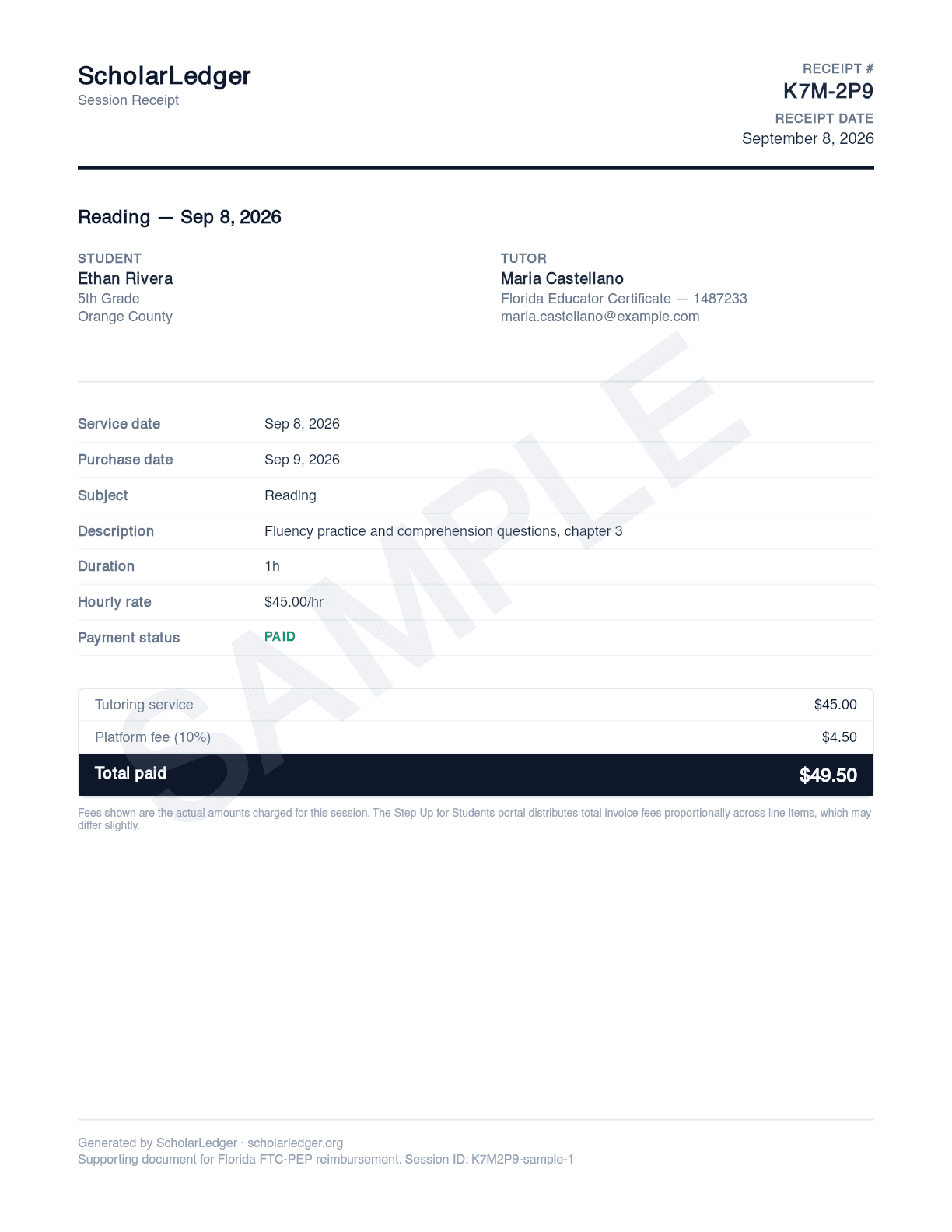
Step Up asks for the invoice and the proof of payment as separate documents. Every session paid through ScholarLedger gets its own receipt, numbered to match the invoice line it appears on.
Purchase date vs. service date. EMA asks for both. The purchase date is when the card payment cleared; the service date is when the tutoring happened.
Fee breakdown.The tutoring service, the platform fee, and the total paid appear as three lines, matching the invoice's columns for that session.
Payment status. Shows Paid only once the payment has actually cleared, not when the session was logged.
Why a blank template isn't enough
Most of what makes this document work isn't the layout. It's the things a template can't produce:
- •A payment record. The paid-in-full badge and the receipt exist because a card payment cleared through Stripe to the named tutor. Step Up denies cash paid to private individuals and won't accept unofficial paperwork.
- •A credential that travels with the invoice. The tutor's credential is captured once and printed on every invoice and receipt, in the affidavit and the header.
- •Duplicate protection. Locked sessions and a hashed invoice mean the same hour can't be submitted twice by accident, which is one of the fastest ways to draw an audit.
- •An EMA entry sheet. Alongside the PDF, ScholarLedger gives you every value in EMA's field order with copy buttons, because EMA still requires you to type each line item.
Get this invoice for your own sessions
Free for parents and tutors. Add your student, connect your tutor, pay each session by card, and generate the invoice and receipts when you're ready to submit.
Frequently asked questions
Can I download this invoice and fill it in for my own tutor?
No. It is a sample generated with fictional names and is stamped as such. Your invoice needs to be tied to a real payment record, which is what makes it acceptable as proof of payment. ScholarLedger produces one for free once a session is paid through the platform.
Why does the platform fee appear in a column called Tax, Shipping, etc?
Because that is the name of EMA's field for anything charged on top of the base cost. Step Up requires fees to be broken out, and the EMA line-item form calculates each row as Quantity × Cost + Tax. Putting the fee there keeps the invoice math identical to what the portal computes.
Why is there a separate receipt for each session?
Step Up wants proof of payment alongside the invoice. Each session is a separate card payment, so each gets its own receipt showing the purchase date, the service date, the payment status, and the fee breakdown for that transaction.
Does Step Up accept invoices in this format?
The layout is built around Step Up's published receipt and invoice requirements and EMA's line-item field names. Reimbursement approval is always determined by Step Up for Students, and ScholarLedger does not guarantee it.
All names, numbers, and addresses in the sample are fictional. ScholarLedger is not affiliated with Step Up for Students or the Florida Department of Education. Reimbursement eligibility and approval are determined solely by Step Up.